


Files by Google
4.5205.33K Reviews
App Specs
- Version
- 1.12252.964568919.2-release
- Updated On
- License
- Free
- Downloads
- 5,000,000,000+
- Developer
- Google LLC
- Categories
- Tools
- Platform
- Android, iOS
Screenshots
 Analysis by AppCompare
When my phone starts filling up with screenshots, downloads and clips I meant to sort later, I want a file manager that helps me make a decision quickly rather than turning cleanup into a project. Files by Google is at its best in that role: it brings everyday storage tasks into one place and makes common actions easy to spot. I’d recommend it to someone who wants a straightforward way to browse local files, reclaim space and move items to another nearby phone, but I wouldn’t treat it as a replacement for every specialist file tool.
Quick access without a complicated setup
Files by Google is a free Android tools app from Google LLC. Its scale is striking: it has a 4.5 average from around 8.9 million ratings, with over 5 billion installs. That kind of reach makes it a familiar starting point for basic phone housekeeping, although popularity alone does not tell you whether its approach fits your habits. The age rating is Everyone, and it is currently at version 1.11362.916736205.0-release.
My first impression is that the app is designed to reduce the number of steps between noticing a problem and doing something about it. Instead of making me dig through a long folder tree before I can act, it puts cleanup suggestions, file browsing and sharing within easy reach. That is useful when I have a minute between errands and simply want to locate a downloaded document or check what is taking up room.
Guides and Analysis on Files by Google
For speed, I’d set expectations around everyday convenience rather than dramatic performance gains. Browsing by familiar file groups can feel faster than opening folders one by one, particularly when I only remember that something was a picture or a document. Cleanup still requires my attention: recommendations are a prompt to review, not a reason to delete everything automatically. Taking a moment to check what is selected is a worthwhile habit, especially before removing items I may need again.
When the phone is under pressure
Cleanup becomes most useful when storage is tight and the symptoms are already getting in the way: downloads fail, new photos are harder to manage, or the phone keeps warning that space is running low. In that moment, I would start with the app’s suggestions, then browse the larger files and old downloads myself. That two-part approach is more dependable than blindly clearing anything labeled as clutter, because a file that looks disposable may still matter to me.
A practical example: after a weekend away, I might have several large videos alongside screenshots of tickets and directions. I’d review the videos first, keep the ones I want, and then use the category view to find the screenshots or downloads I no longer need. The useful distinction is between finding candidates quickly and deciding what can safely go. Files by Google helps with the first; the final call should remain mine.
Heavy use can expose the limits of any simple file manager. A large collection spread across many folders takes more deliberate browsing, and suggested cleanup cannot understand the personal meaning of every item. If I am sorting work archives, renaming lots of files, or maintaining a carefully structured folder system, I would rather use a more advanced manager built around those tasks. This app is more comfortable for quick, common actions than for detailed file administration.
Worth Reading Before You Choose

Basketball Stars: Multiplayer Is Fast, but Can It Recover When Matches Go Wrong?

WEBTOON Turns Phone Updates Into a Better Reading Routine

Link to Windows Runs on Shared Habits, Not Social Feeds

How Alibaba.com Dominates the B2B Marketplace

Metro's Quiet Rise: Redefining Mobile Communication

Harnessing Ecosystem Power with Phone Tracker by Number
Reliability, transfers and recovery habits
For a small transfer between nearby Android phones, offline sharing is a welcome alternative to messaging apps or cloud storage. It avoids using an internet-based handoff for the transfer itself, which can be handy when I am sharing a few photos while out and about. I would still check that the recipient is ready and that I selected the intended files before sending; a quick transfer is only helpful when it goes to the right place.
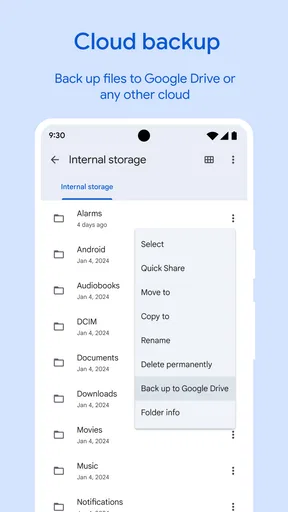
For important material, I would not rely on cleanup or a single copy as a recovery plan. The app can help me organize files and offers a route to back up items to Google Drive, but I would verify that anything I truly need is backed up where I expect it to be. A transfer is not the same thing as a backup, either: moving a file to another phone may solve an immediate sharing need without giving me a dependable second copy.
In normal use, the clean layout makes the app feel approachable, but simplicity also means fewer controls than a specialist tool. If I need to recover a file I deleted, I would first check the relevant device and backup locations rather than assume the app can restore it. A useful habit is to pause before confirming cleanup and to back up important documents before making broad changes. That small bit of care matters more than expecting any organizer to undo every mistake.
A Handy Organization Tool
Let’s start with the basics. Files by Google is designed to help you manage your files and storage efficiently. From the moment you open it, the app makes it super easy to get started. It’s got a clean and intuitive interface, with everything neatly laid out. I’m talking about three main tabs: Clean, Browse, and Share.
Cleaning Up the Clutter
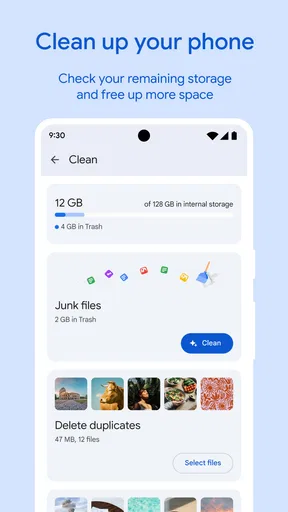
The Clean tab is where the magic begins. This feature is like having a tidy little robot assistant. It identifies junk files, duplicates, and even those memes you forgot to delete. With just a tap, you can free up space. I tested it out and managed to clear a whopping 2GB on my first go! It’s a no-brainer for anyone battling with storage issues.
Browsing with Ease
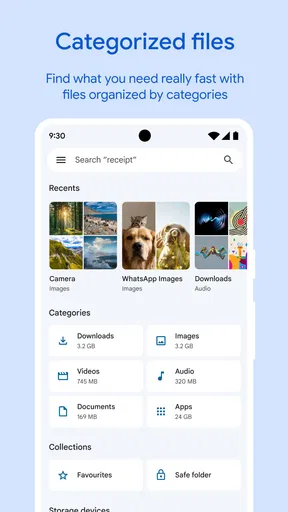
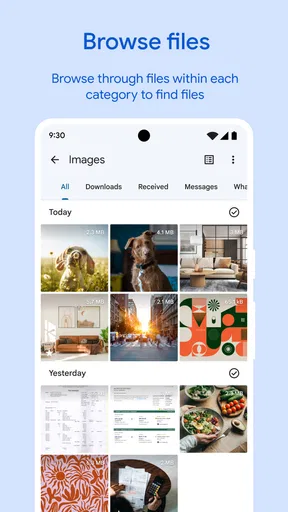
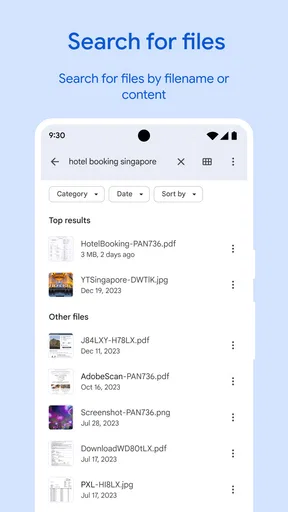
Next up, the Browse tab. This is where you can view all your files. It’s organized into categories like Downloads, Images, Videos, Audio, and Documents. The categorization is spot on, making file navigation a breeze. Plus, you can sort files by date, size, or name. Finding what you need is as easy as pie.
Sharing Made Simple
Sharing files with Files by Google is like sending a postcard – quick and hassle-free. The app uses Bluetooth to transfer files, so you don’t need the internet. I tried sharing a couple of photos with a friend, and it was smooth sailing. No cords, no fuss.
Features You’ll Love
Beyond the basics, Files by Google has a few extra tricks up its sleeve. One of my favorites is the ability to backup files directly to Google Drive. This means you can keep your important documents safe and sound in the cloud. Also, it supports a plethora of file types, so whether it’s a PDF, MP3, or DOC, it’s got you covered.
Security and Privacy
In today’s digital age, security is a big deal. Rest easy, because Files by Google doesn’t skimp on privacy. The app doesn’t send your files to Google servers, so everything stays on your device unless you choose to back it up. That’s a relief for those of us who are a tad paranoid about data privacy.
User Experience
Honestly, using this app feels like a walk in the park. The interface is straightforward, and it doesn’t bombard you with ads. I appreciate the small touches, like the dark mode option for nighttime browsing. It’s these details that make the app feel polished and user-friendly.
Who gets the most from it
I’d point a less technical Android user toward this app if they want to find downloads, review storage and share a few files without learning a complicated folder system. It also suits someone who mostly handles photos, audio, documents and videos, rather than managing a large archive with strict naming rules. Its category-first approach is a helpful shortcut when I remember what kind of file I need but not where I saved it.
There are trade-offs in that simplicity. People who need batch renaming, deep folder customization or more hands-on control over file operations may prefer a dedicated advanced manager. And if most of your files live in a particular cloud service, that service’s own app may be the more direct choice for organizing its online folders. Files by Google makes the most sense when the job is everyday phone storage, not specialized administration.
Small habits that make cleanup safer
One useful workflow is to sort a category by size before removing anything. That shifts attention toward a few large items that can make a meaningful difference, rather than spending time on many tiny files. I’d inspect videos and downloads first, then check images for items I recognize. Sorting by date can also help when I want to review what I have not opened in a while, though age alone is not proof that a file is disposable.
I also like to separate cleanup from archiving. If a document or photo matters, I would decide where its lasting copy should live before removing a local version. Drive backup can be convenient for selected files, while an offline transfer is better for handing something directly to a nearby person. Those actions solve different problems, so choosing deliberately avoids mistaking a one-time share for long-term protection.
As a tools app, it feels most useful when it stays a quick stop rather than becoming another system I have to maintain. I can open it to locate one download, check a cleanup suggestion, or send a small batch of photos, then leave. If I find myself repeatedly searching through nested folders or needing precise control over a collection, that is a sign my needs have outgrown its lightweight approach, not necessarily that the app is failing.
Performance verdict
Files by Google is a practical choice when I value clear navigation and quick access to common storage tasks more than an extensive set of controls. Its broad adoption and strong average rating suggest many people find that balance useful, but my recommendation is narrower: try it if you want a simple Android file organizer with cleanup and offline sharing close at hand. It is free, and its Everyone age rating makes it suitable for a broad audience.
For a person who regularly worries about a full phone, the most useful feature is not a promise that every cleanup will be effortless; it is having a clear place to inspect files and make informed choices. I’d use the suggestions as a starting point, verify important items before deleting them, and keep a separate backup for anything I could not replace. If that careful, uncomplicated routine sounds right, this is an easy app to recommend. If you need deep file control or a specialist cloud workflow, another tool will likely fit better.
Final Thoughts
All in all, Files by Google is a must-have for anyone looking to keep their phone organized. It’s efficient, easy to use, and packed with features that make managing files a breeze. Whether you’re a digital hoarder or just looking to free up some space, this app has got your back. So go ahead, give it a whirl, and let me know how much space you manage to save!
Ready to take control of your files? You can download Files by Google from the links provided on our site. Happy file managing!
Pros
- Efficient file management system.
- User-friendly interface design.
- Integrated file sharing feature.
- Effective storage space cleaner.
- Supports offline file access.
Cons
- Limited cloud storage integration.
- No direct file transfer to PC.
- Lacks advanced file editing tools.
- Occasional in-app ads.
- No built-in media player.
FAQs for Files by Google
What is Files by Google and what does it do?
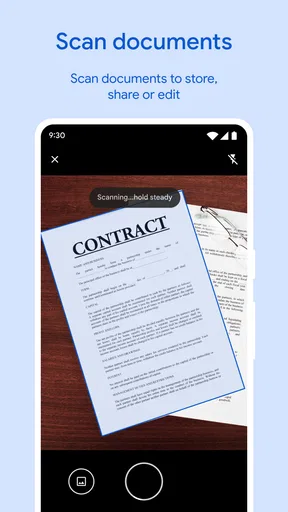
Files by Google is a file management app designed to help users organize, clean, and manage their phone's storage efficiently. It offers features like file browsing, media organization, and storage cleaning tools. The app also allows for easy file sharing without using data and supports offline access to files.
How does Files by Google help in freeing up storage space?
Files by Google provides tools to identify and remove junk files, duplicate files, and large files that may be unnecessarily occupying space. The app offers smart recommendations to delete temporary files, unused apps, and old media, helping users optimize their device's storage efficiently.
Is Files by Google safe for my data?
Yes, Files by Google is a secure app developed by Google, ensuring a high standard of data privacy and security. The app does not share your files without your consent, and all file transfers are encrypted, providing a safe environment for file management and sharing.
Can Files by Google transfer files without an internet connection?
Yes, Files by Google allows users to share files offline using a feature that creates a local hotspot. This method is fast and secure, enabling users to transfer photos, videos, and other files to nearby devices without consuming mobile data or Wi-Fi.
Is Files by Google compatible with all Android devices?
Files by Google is compatible with most Android devices running Android 5.0 Lollipop and above. It is designed to work efficiently across different hardware configurations, ensuring that users can manage their files seamlessly on a wide range of smartphones and tablets.


